Improve the navigation of your website with PrestaShop Module: Advanced Mega Menu Pro. Simple customization, improved user experience, and mobile-friendly surfing.
One of the best ways to improve how visitors navigate your website is by installing the top-rated Advanced Top PrestaShop Mega Menu Pro module. What follows is a detailed discussion of the said module.
Advanced Features
- Customizable menu layouts allow for unique navigation structures tailored to your website's needs.
- Dropdown options enable hierarchical organization of menu items, facilitating easy navigation through various categories and subcategories.
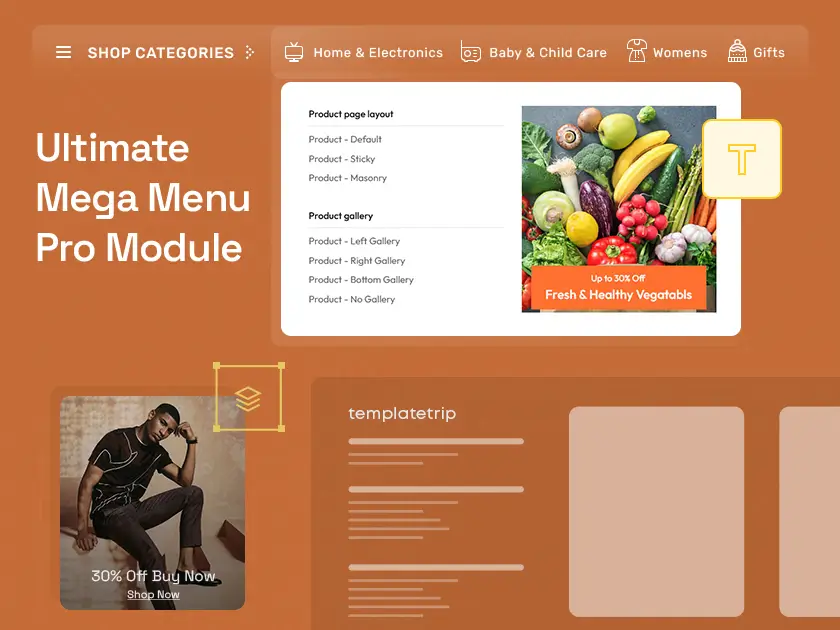
- Integration with images, icons, and promotional banners enhances the visual appeal of the menu, making it more engaging for users.
- Advanced customization options include font styles, colours, and hover effects, allowing you to align the menu design with your brand identity.
Awesome Design
- Sleek and modern design elements create a visually appealing menu that captivates users' attention.
- Attention to detail in design ensures that the menu complements the overall aesthetic of your website, contributing to a cohesive user experience.
- A clean and intuitive layout minimizes clutter, making it easy for users to navigate through menu options effortlessly.
Easy-to-Use
- An intuitive user interface requires minimal technical expertise, making it accessible to administrators of all skill levels.
- A user-friendly backend dashboard provides straightforward controls for managing menu content, settings, and configurations.
- The quick setup process streamlines the implementation of the Mega Menu Pro, allowing you to get your navigation system up and running in no time.
Perfect Mobile Responsiveness
- Responsive design ensures that the Mega Menu Pro adapts seamlessly to various screen sizes and resolutions, providing an optimal viewing experience on mobile devices.
- Mobile-friendly navigation elements, such as collapsible menus and touch-friendly controls, enhance usability for smartphone and tablet users.
- Fluid layout adjustments maintain visual coherence and usability across different devices, eliminating the need for separate mobile-specific menus.
Visual Drag/Drop Backend
- The intuitive drag-and-drop interface simplifies the process of building and customizing your Mega Menu Pro.
- Real-time preview functionality allows you to visualize changes instantly, facilitating iterative design adjustments.
- Drag-and-drop functionality extends beyond menu items, enabling the effortless rearrangement of menu sections, columns, and content blocks.
Support for Vertical & Horizontal Menus
- Flexible layout options cater to diverse design preferences and website layouts.
- Vertical menu layouts offer a classic navigation structure suitable for websites with extensive product categories or content hierarchies.
- Horizontal menu layouts provide a sleek and space-efficient navigation solution, ideal for showcasing top-level menu items with accompanying dropdowns.
Responsive Menu
- Adaptive design principles ensure that the Mega Menu Pro maintains usability and functionality across desktops, laptops, tablets, and smartphones.
- Fluid layout adjustments dynamically reposition menu elements and resize text to accommodate different screen dimensions.
- Touch-friendly navigation controls enhance user interaction on touchscreen devices, optimizing the mobile browsing experience.
Extensive Support and Documentation
- Comprehensive user guides, tutorials, and documentation resources facilitate smooth installation, configuration, and customization of the Mega Menu Pro module.
- Dedicated customer support channels provide assistance and troubleshooting guidance to address any issues or inquiries promptly.
- Regular updates and patches ensure ongoing compatibility with PrestaShop platform updates and address any reported bugs or performance issues.
Installation Process
- Purchase Module: Buy the desired module from TemplateTrip's website.
- Download Package: Access your TemplateTrip account and download the module package.
- Log in to PrestaShop: Log in to your PrestaShop admin panel.
- Navigate to Modules: Go to the "Modules" section in the PrestaShop dashboard.
- Upload Module: Click on "Upload a module" and select the module file (.zip) from your computer.
- Install Module: Once uploaded, click "Upload this module" to install it.
- Locate Installed Module: Find the installed module in the modules list.
- Configure Settings: Click on the module to access its settings and configure them according to your preferences.
Checkout our guidelines
https://www.templatetrip.com/help/prestashop-1-7-x-how-to-manage-tt-megamenu-module/